
All four read like short essays. Every headline starts with "On", set in a serif over a photo of a pair of tortoise frames in warm window light: On second thoughts, On the first week, On October, On expiry dates. An AI agent wrote, designed and built every one of them in Nitrosend.1
Abandoned cart email
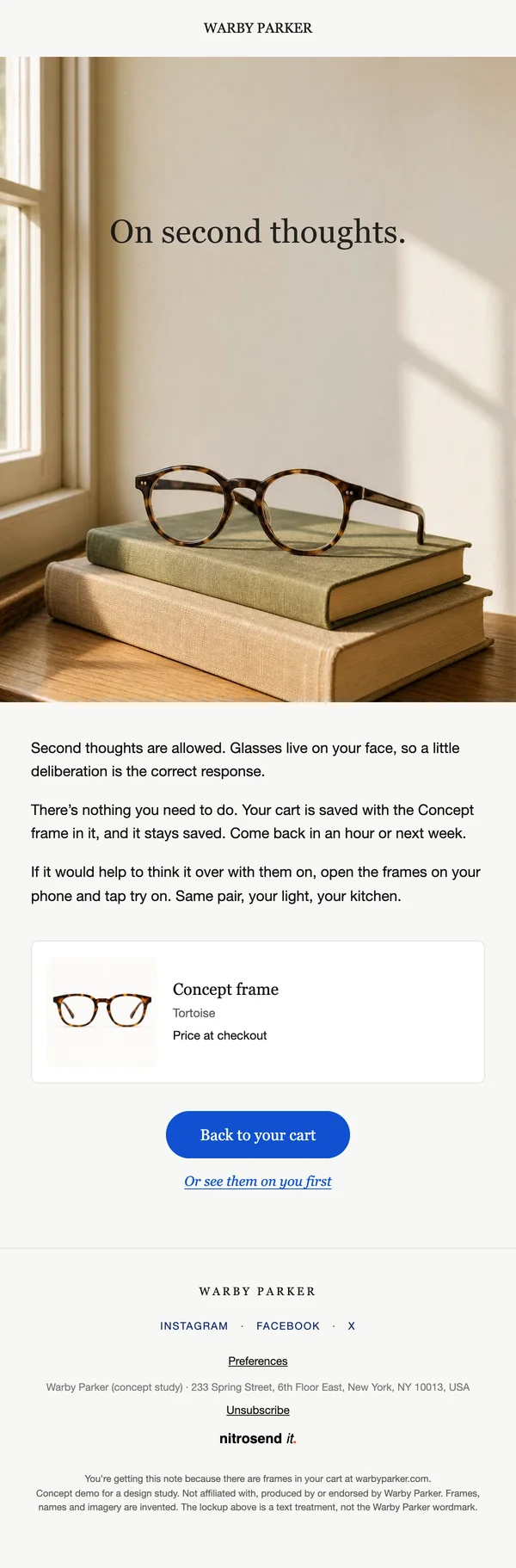
Abandoned cart
We kept them for you
The frames sit on a stack of books by a window, the cart item is shown in a card below, and there is one button back to the cart with no discount.
The copy gives the reader permission to wait: "Second thoughts are allowed. Glasses live on your face, so a little deliberation is the correct response." The second link answers the real reason people stop at the cart, which is not knowing how the frames will look, by sending them to try the pair on from their phone.
Review request email
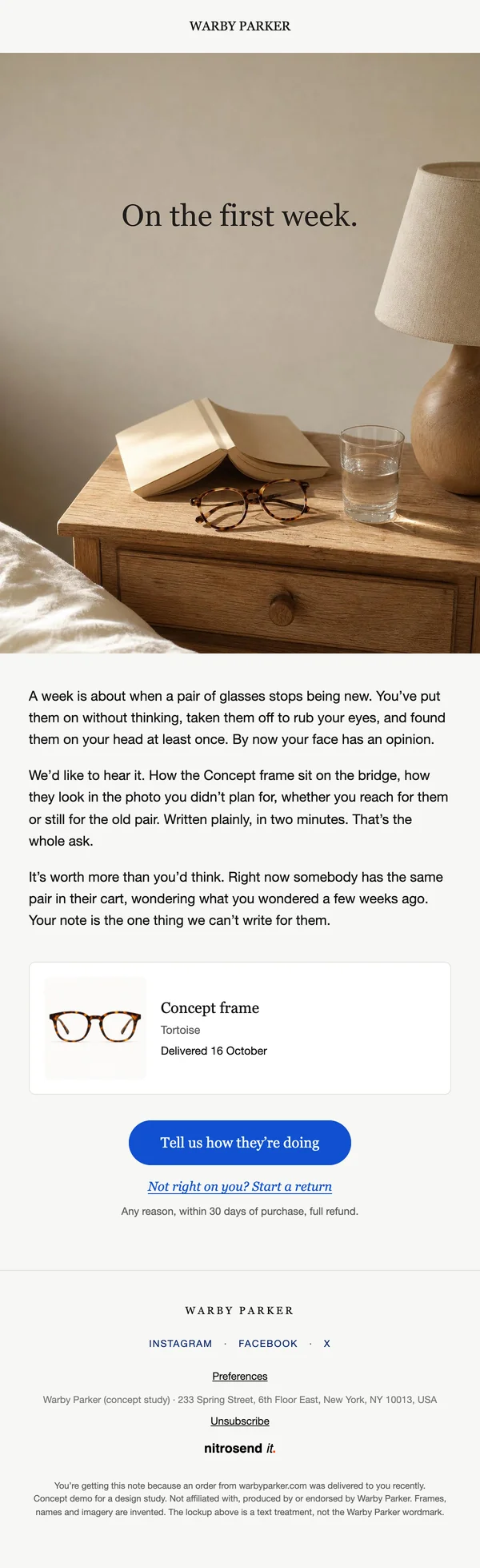
Review request
How are they on your face?
Sent a week after delivery, it shows the exact pair and the delivery date, and asks for one thing: a few plain sentences on how they feel.
The opening earns the ask. It describes the first week with a new pair so precisely, taking them off to rub your eyes and finding them on your head, that the reader is already forming the opinion the email wants. The return link sits under the button with the 30-day full refund in one line, so an unhappy customer has somewhere to go that is not a one-star review.
Newsletter
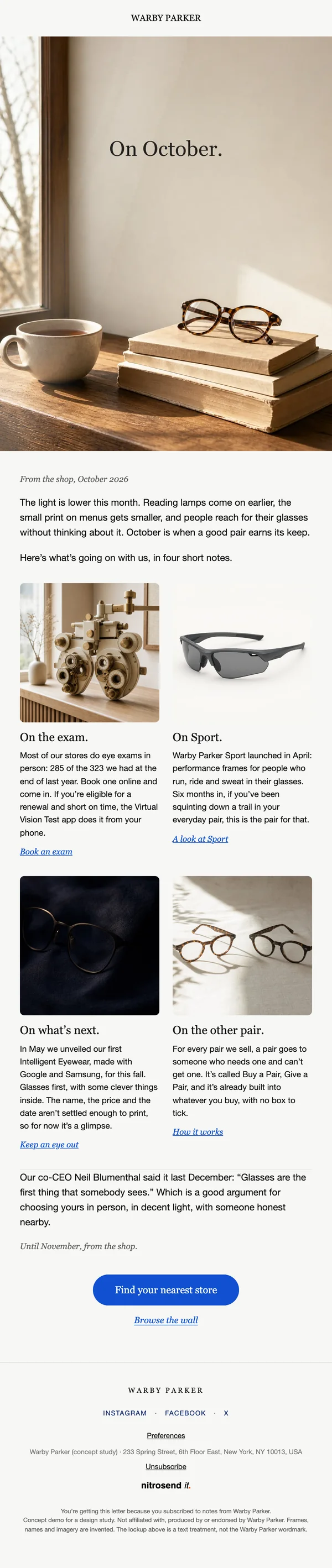
Newsletter
On October
A letter from the shop: one hero, a short seasonal opening, then four two-up stories, each with a picture, a few lines and a link, then one button to the nearest store.
The four stories are real Warby Parker news from its own filings and announcements: eye exams in 285 of its 323 stores, Warby Parker Sport at six months, the Intelligent Eyewear made with Google and Samsung, and Buy a Pair, Give a Pair. It closes on a line co-CEO Neil Blumenthal said in December 2025, "Glasses are the first thing that somebody sees", and turns it into a reason to visit a store.
Re-engagement email
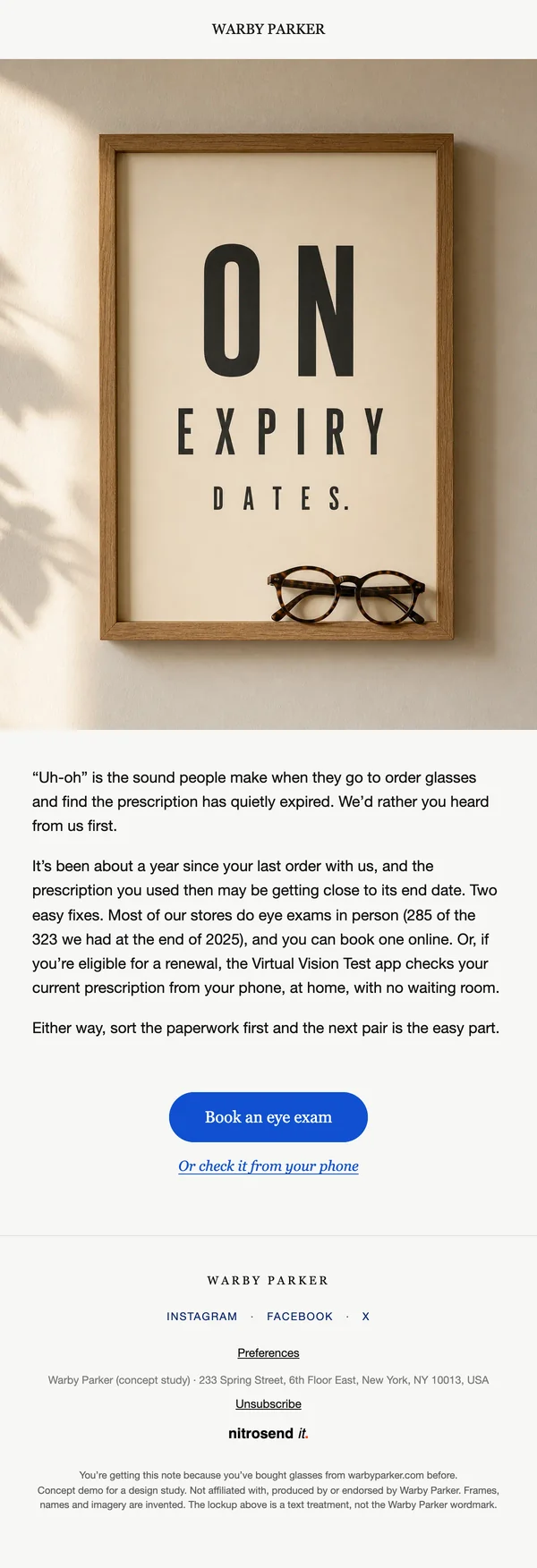
Re-engagement
Is your prescription still good?
It wins back a lapsed customer with a useful reminder instead of an offer: a year has passed, so their prescription may be about to expire.
The hero is an eye chart that spells out the headline, and the first line borrows the "Uh-oh" from a real Warby Parker reminder, whose subject line was "Uh-oh, your prescription is expiring". It gives two fixes, an in-store eye exam or a renewal from the Virtual Vision Test app, and leaves the next pair as the easy part.
What makes these emails work
- Layout. Every email uses the same frame: a centred WARBY PARKER wordmark, a full-bleed hero with the headline set into the photo, three short paragraphs, a product card where there is a product, one pill button and a plain footer on warm off-white.
- Color. Warm cream and wood tones in every photo, near black text, and one saturated blue that belongs only to the button and the links.
- Type. Headlines and buttons are in a serif, Georgia in the email, and the body copy is a plain sans serif at a large, easy size. The second link under each button is a serif italic.
- Button. One button per email with a plain instruction, such as Back to your cart or Book an eye exam. A softer second option sits under it as a text link.
- Copy. No discounts, codes or countdowns. The facts come from Warby Parker's own annual report and announcements, such as the eye exams in 285 stores and the 30-day returns.
- Motion. Three of the four heroes are animated. The light moves slowly across the scene while the headline stays still.
Build these emails in Nitrosend
- Connect Nitrosend to Claude, ChatGPT, Cursor or any AI that supports MCP. Setup is on the email MCP page, and Claude users can follow the guide to sending email from Claude.
- Paste the prompt below, with your own website in place of [your website].
- Review each email in Nitrosend, check the images and copy, and send yourself a test.
Paste the prompt into Claude, ChatGPT, Cursor or any AI with Nitrosend MCP connected, and swap in your own brand.
Using Nitrosend, design and build an abandoned cart, review request, newsletter and re-engagement email for my brand, in the style of these Warby Parker email examples: https://nitrosend.com/email-examples/brands/warby-parker

My brand's website is [your website].

If Nitrosend is not connected yet, read https://nitrosend.com/SKILL.md and follow it to connect the Nitrosend MCP server (https://api.nitrosend.com/mcp), then ask me to sign in or create a free account at app.nitrosend.com. On Claude.ai use claude.ai/directory/nitrosend; in ChatGPT, install the Nitrosend app.

Then write and design every email, build each one in Nitrosend, and send me a test of each email.
FAQ
Which email types are on this page?
Four: an abandoned cart email, a review request, a monthly newsletter and a re-engagement email.
Can I make these emails for my own brand?
Yes. Copy the prompt above into an AI assistant connected to Nitrosend and give it your website. It writes, designs and builds each email in your brand in Nitrosend, then sends you a test.
Why does the abandoned cart email have no discount?
Because glasses are a considered purchase, and a discount would rush a decision the email tells the reader to take slowly. It solves the real hesitation instead, which is how the frames will look, with a link to try them on from a phone.
Which AI made these emails?
Claude, connected to Nitrosend over MCP. It set the brand kit, wrote the copy, placed the images and built each email as a draft flow in Nitrosend.
Go deeper
1 Warby Parker is not a Nitrosend customer and did not send or endorse these emails. Every image in them is concept artwork, and the Concept frame is an invented product.