

Starter
For your first email program.
$16USD / month
$192 billed yearly.
20,000 emails / month
Choose Starter- 5 brands · 3 seats
- 5 custom sending domains
- 500 email verifications/month
- $1.50 / 1,000 extra emails
One Everlane email for each of four email types, from the welcome to the order confirmation, with a note on what makes each one work.
The whole set is built like a receipt. Wide capitals for headlines, labelled tables with thin rules, prices set out line by line, and one black bar of a button. It fits a brand whose big idea is Radical Transparency. An AI agent wrote, designed and built every one of them in Nitrosend.1
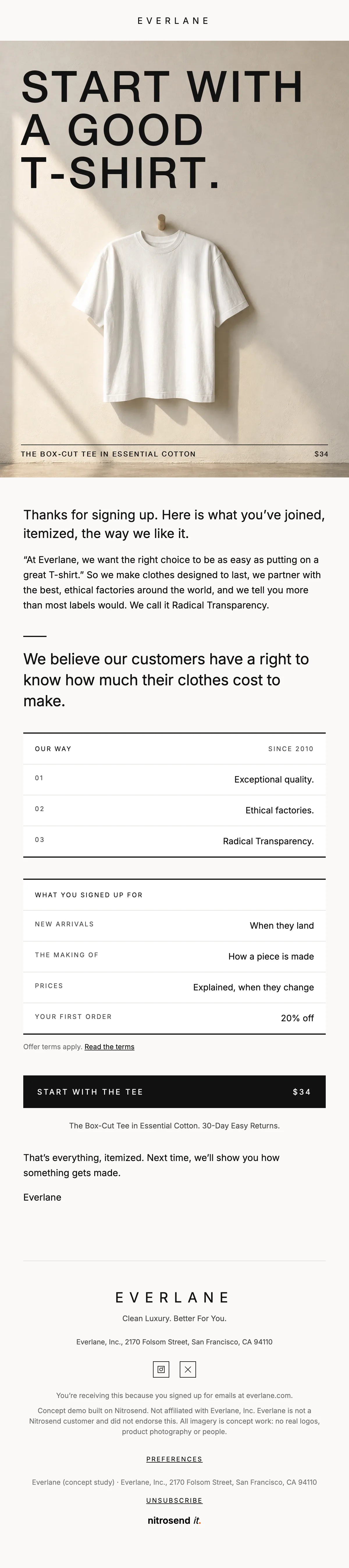
The welcome itemizes what the reader just joined: quality, ethical factories and Radical Transparency, then what the emails will contain and when.
It ends on one product, the Box-Cut Tee at $34, and the first-order offer with a link to its terms. Starting with one thing to buy keeps the first email from turning into a catalog.
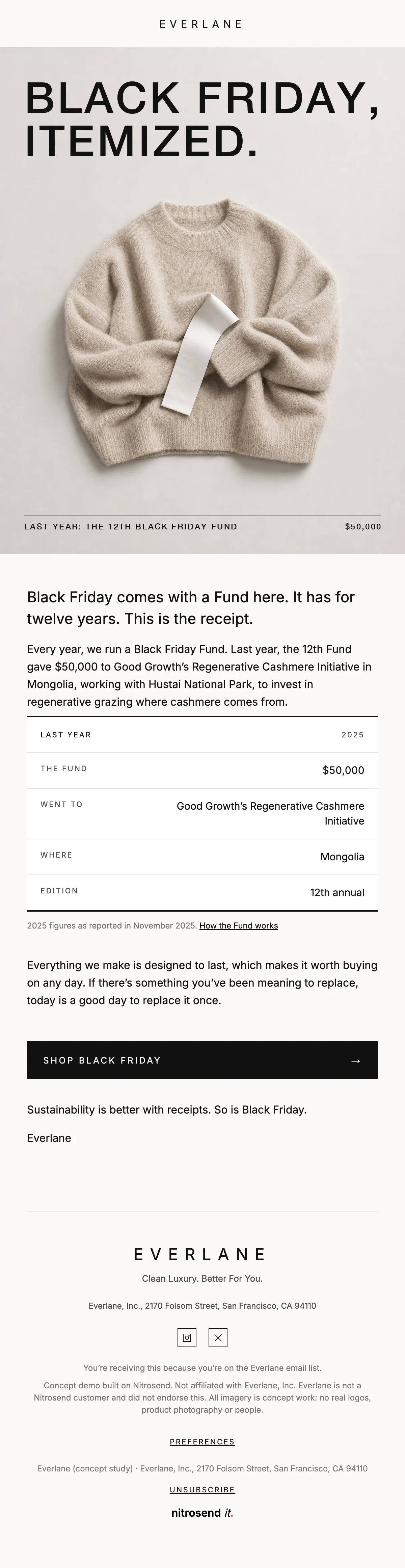
"Black Friday, itemized." Everlane runs a Black Friday Fund every year, and the email leads with last year's: $50,000 to a regenerative cashmere project in Mongolia.
A table sets out the Fund's year, amount, partner, place and edition, with a note on where the figures come from. The sale comes after the receipt, which is the order the brand would choose.
"Notes on a price." A newsletter about the new prices Everlane introduced on some essentials in August, and the one point that matters: the product stayed the same.
The new prices are listed plainly in a table, in dollars, dated. A brand that talks about cost should show the numbers when they change, and this email does.
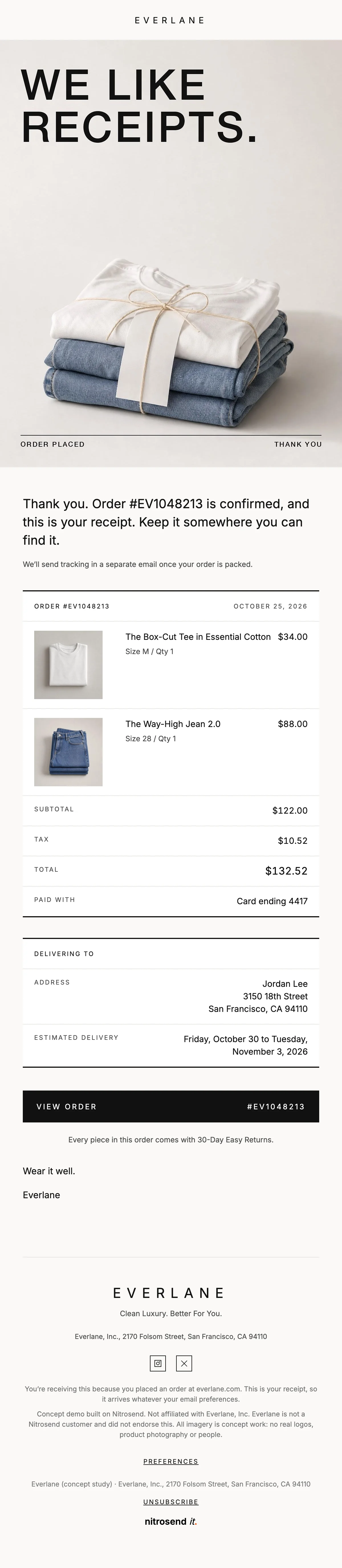
"Order #EV1048213 is in. Here's everything, itemized." The receipt lists each piece with size, quantity and price, then the subtotal, tax and total.
Payment, address and the delivery window follow in the same labelled rows, and the last line reminds the buyer that every piece comes with 30-day easy returns.
Paste the prompt into Claude, ChatGPT, Cursor or any AI with Nitrosend MCP connected, and swap in your own brand.
Using Nitrosend, design and build a welcome, Black Friday, newsletter and order confirmation email for my brand, in the style of these Everlane email examples: https://nitrosend.com/email-examples/brands/everlane

My brand's website is [your website].

If Nitrosend is not connected yet, read https://nitrosend.com/SKILL.md and follow it to connect the Nitrosend MCP server (https://api.nitrosend.com/mcp), then ask me to sign in or create a free account at app.nitrosend.com. On Claude.ai use claude.ai/directory/nitrosend; in ChatGPT, install the Nitrosend app.

Then write and design every email, build each one in Nitrosend, and send me a test of each email.
Which email types are on this page?
Four: a welcome, a Black Friday email, a newsletter and an order confirmation.
Were these emails designed as concepts for Everlane?
Yes. They are concept emails designed for Everlane using the Nitrosend MCP. Claude wrote the copy, made the images and built each email as a draft flow in Nitrosend. Prices and the Fund figures come from Everlane's own pages; the order, customer and address are samples.
Can I make these emails for my own brand?
Yes. Copy the prompt above into an AI assistant connected to Nitrosend and give it your website. It writes, designs and builds each email in your brand in Nitrosend, then sends you a test.
1 Everlane is not a Nitrosend customer and did not send or endorse these emails. Every image in them is concept artwork.
Every plan includes full stack emailing: Flows, Newsletter Campaigns and Transactional Email, plus our NitroWheel LLM and all agent integrations (Claude, ChatGPT, Codex, Cursor and others). Pay for what you send, not who you store.
Every paid plan includes 3 agent inboxes and no Nitrosend footer.
For your first email program.
$192 billed yearly.
20,000 emails / month
Choose StarterFor a growing audience.
$480 billed yearly.
60,000 emails / month
Choose ProFor teams and agencies.
$1,440 billed yearly.
200,000 emails / month
Choose GrowthFor high-volume sending.
$2,880 billed yearly.
500,000 emails / month
Choose ScaleSending 500,000+ emails a month? Get a custom plan designed for you, with volume email pricing and capacity that fits your business.
5,000 emails to start, then 500 emails every month. No expiry on your starter emails.
Daily allowances depend on your plan and sender standing. Strong list, domain and delivery evidence can raise standing, including on day one. Trusted receives the full plan allowance; available email credits, safety checks and delivery pacing still apply.
Free forever. No credit card required. See full comparison →