
Starter
For your first email program.
$16USD / month
$192 billed yearly.
20,000 emails / month
Choose Starter- 5 brands · 3 seats
- 5 custom sending domains
- 500 email verifications/month
- $1.50 / 1,000 extra emails
One Spotify email for each of four email types, from the welcome to a feature launch, with a note on what makes each one work.
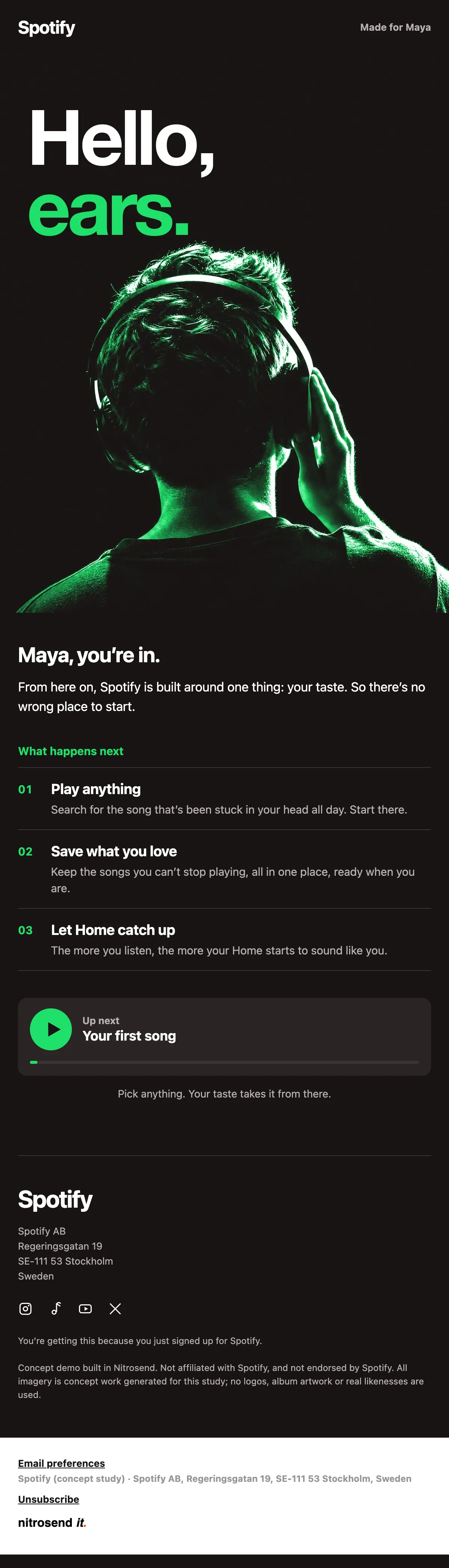
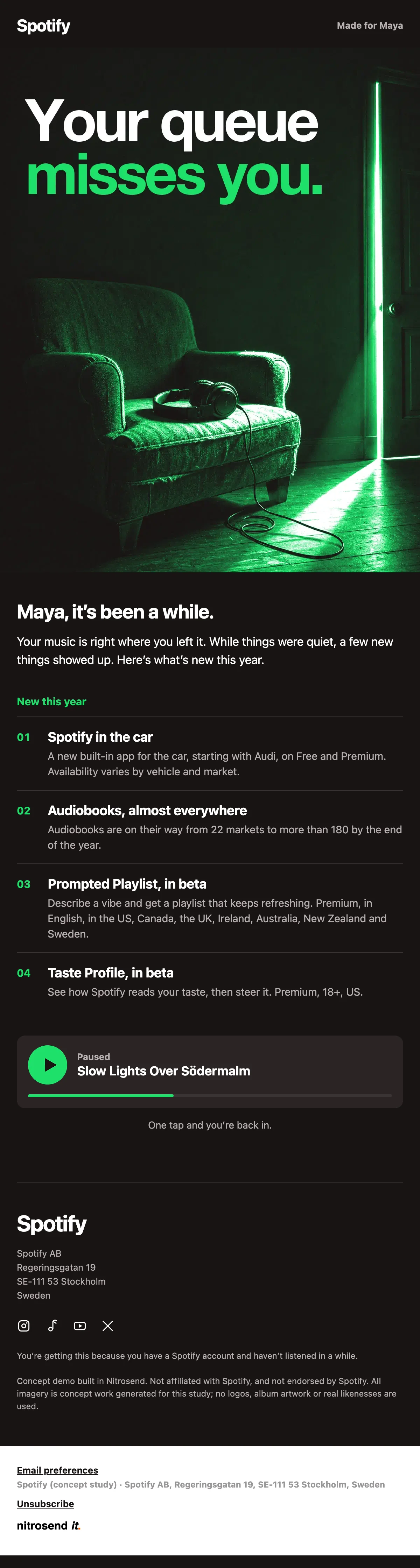
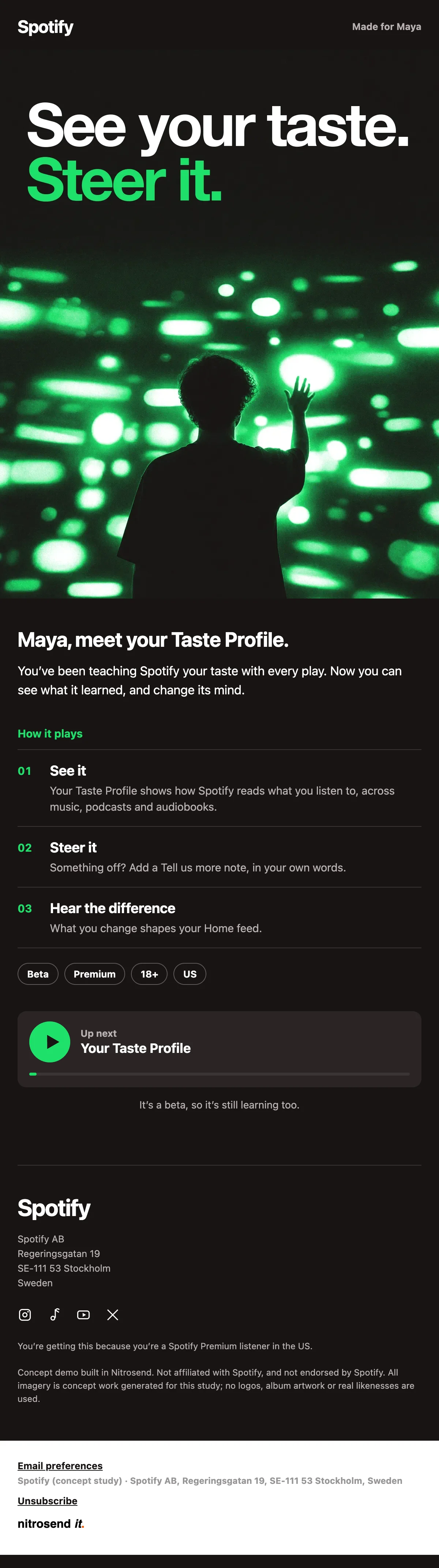
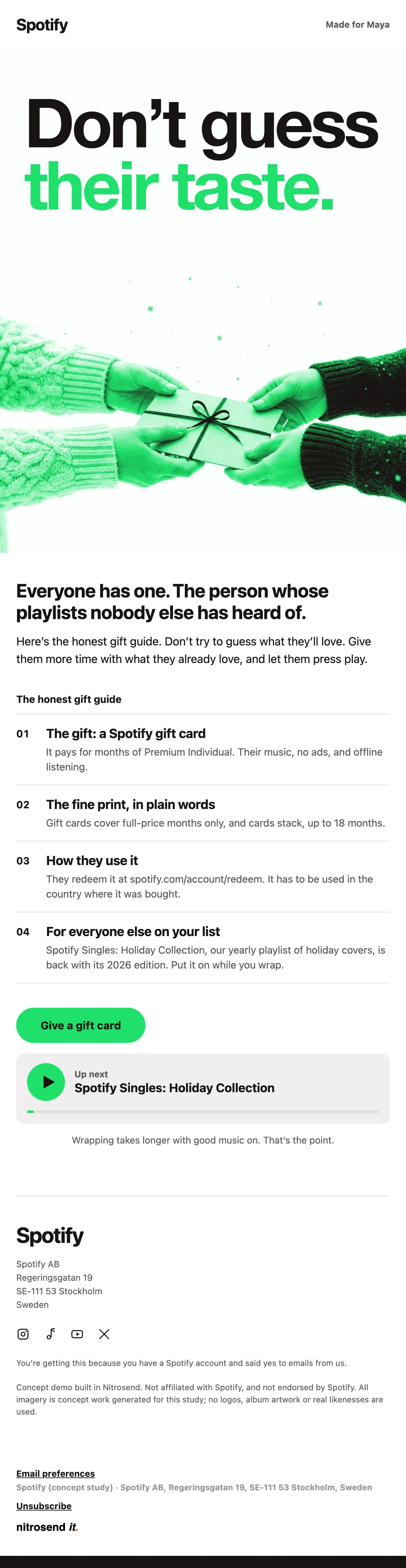
All four are black with one bright green. The heroes are photos washed in that green, the headline sits in two lines, white then green, and the body is a numbered list of short items with one button. An AI agent wrote, designed and built every one of them in Nitrosend.1
"Hello, ears." The welcome makes one promise, that Spotify is built around the listener's taste, and then says there is no wrong place to start.
Three numbered steps follow: play anything, save what you love, let Home catch up. The button asks for one song. A first session is the whole goal, so the email asks for nothing else.
"Your queue misses you." The hero is an empty armchair with headphones on it, and the first line says the listener's music is right where they left it.
Then it lists four things that are new this year, each with who can use it and where, from Spotify in the car to Taste Profile in beta. The last block is the paused track, with one tap to start it again.
"Don't guess their taste." A gift guide with one gift in it: a Spotify gift card for months of Premium, so the person keeps their own music.
The fine print is in plain words: full-price months only, cards stack up to 18 months, redeem in the country where it was bought. The email ends on the yearly holiday playlist, something for everyone else on the list.
"See your taste. Steer it." The launch of Taste Profile in beta, which shows how Spotify reads what you listen to and lets you correct it.
Three steps explain it: see it, steer it, hear the difference. Then a row of tags says exactly who has it: Premium, 18+, US. Naming the limits in the email stops everyone else from looking for a feature they can't use yet.
Paste the prompt into Claude, ChatGPT, Cursor or any AI with Nitrosend MCP connected, and swap in your own brand.
Using Nitrosend, design and build a welcome, re-engagement, Christmas and product launch email for my brand, in the style of these Spotify email examples: https://nitrosend.com/email-examples/brands/spotify

My brand's website is [your website].

If Nitrosend is not connected yet, read https://nitrosend.com/SKILL.md and follow it to connect the Nitrosend MCP server (https://api.nitrosend.com/mcp), then ask me to sign in or create a free account at app.nitrosend.com. On Claude.ai use claude.ai/directory/nitrosend; in ChatGPT, install the Nitrosend app.

Then write and design every email, build each one in Nitrosend, and send me a test of each email.
Which email types are on this page?
Four: a welcome, a re-engagement email, a Christmas gift guide and a product launch.
Were these emails designed as concepts for Spotify?
Yes. They are concept emails designed for Spotify using the Nitrosend MCP. Claude wrote the copy, made the images and built each email as a draft flow in Nitrosend. To make the same set for your own app, copy the prompt on this page into any AI connected to Nitrosend.
Can I make these emails for my own app?
Yes. Copy the prompt above into an AI assistant connected to Nitrosend and give it your website. It writes, designs and builds each email in your brand in Nitrosend, then sends you a test.
1 Spotify is not a Nitrosend customer and did not send or endorse these emails. Every image in them is concept artwork.
Every plan includes full stack emailing: Flows, Newsletter Campaigns and Transactional Email, plus our NitroWheel LLM and all agent integrations (Claude, ChatGPT, Codex, Cursor and others). Pay for what you send, not who you store.
Every paid plan includes 3 agent inboxes and no Nitrosend footer.
For your first email program.
$192 billed yearly.
20,000 emails / month
Choose StarterFor a growing audience.
$480 billed yearly.
60,000 emails / month
Choose ProFor teams and agencies.
$1,440 billed yearly.
200,000 emails / month
Choose GrowthFor high-volume sending.
$2,880 billed yearly.
500,000 emails / month
Choose ScaleSending 500,000+ emails a month? Get a custom plan designed for you, with volume email pricing and capacity that fits your business.
5,000 emails to start, then 500 emails every month. No expiry on your starter emails.
Daily allowances depend on your plan and sender standing. Strong list, domain and delivery evidence can raise standing, including on day one. Trusted receives the full plan allowance; available email credits, safety checks and delivery pacing still apply.
Free forever. No credit card required. See full comparison →