
Starter
For your first email program.
$16USD / month
$192 billed yearly.
20,000 emails / month
Choose Starter- 5 brands · 3 seats
- 5 custom sending domains
- 500 email verifications/month
- $1.50 / 1,000 extra emails
One Airbnb email for each of four email types, from the welcome to the win-back, with a note on what makes each one work.
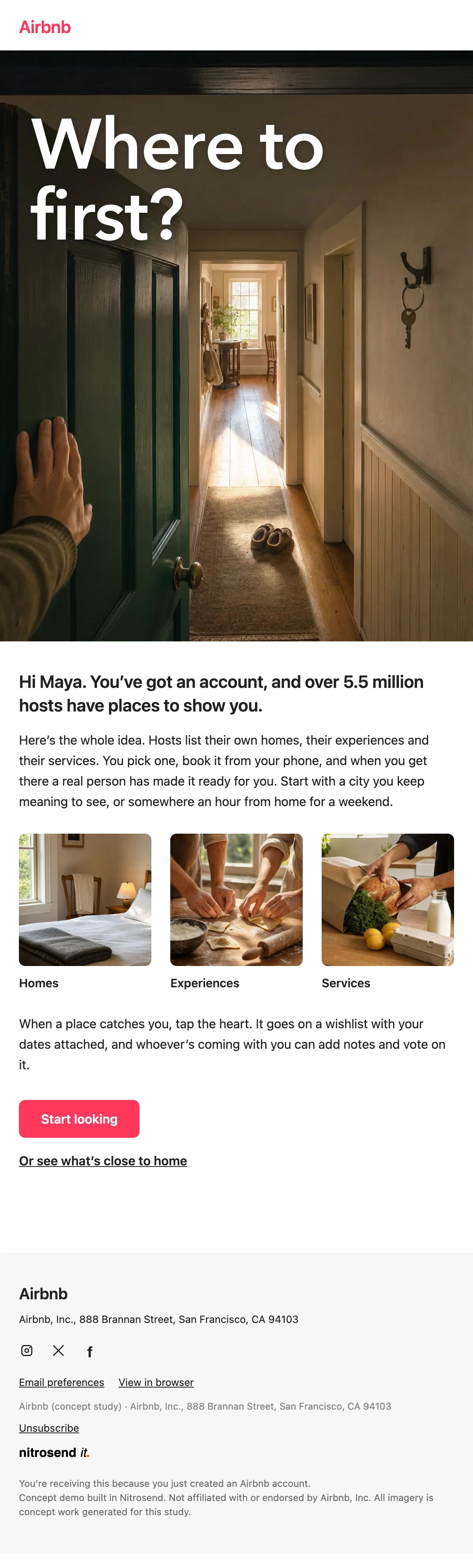
Every hero is a photo taken from the guest's own eye level: a hand pushing open a front door, bare feet on warm tiles, keys set down on a kitchen table, a person at an open window. Each headline is a question. Below the photo the email is white, with the type in near black and the Airbnb pink saved for the button. An AI agent wrote, designed and built every one of them in Nitrosend.1
"You're in. Where to first?" The subject asks the question every new guest already has, and the hero answers with a door swinging open onto a hallway in morning light.
The body says what Airbnb is in one line, over 5.5 million hosts with homes, experiences and services, then shows those three as photo tiles. It ends on one job, start looking, with a second link for somewhere close to home.
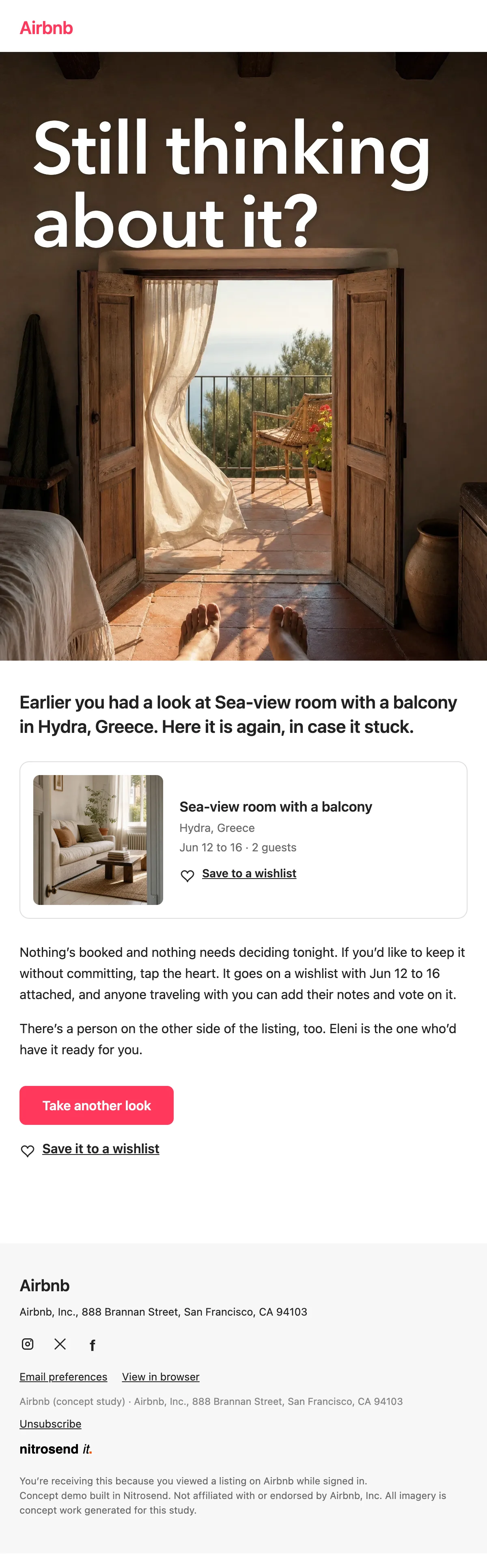
Sent two hours after a guest looks at a listing and leaves without booking or saving it. The subject names the place, "Still thinking about Sea-view room with a balcony?", so the email is about their choice, not Airbnb's.
The listing card repeats the photo, the town and the dates they searched, and the email asks for the smallest next step: save it to a wishlist. It also says what nobody needs to hear twice, that nothing is booked and nothing needs deciding tonight.
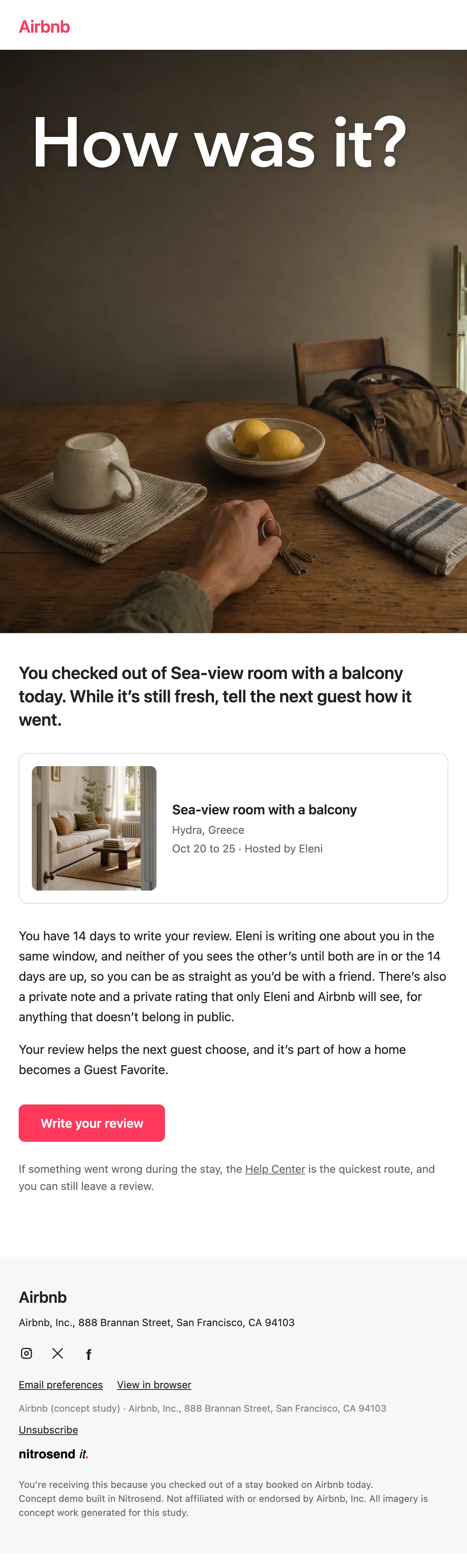
"How was it?" goes out 90 minutes after checkout, while the stay is fresh. The hero is the last moment of the trip: keys on the table, the bag packed by the door.
The body gives the two facts that get a guest to write: they have 14 days, and the host won't see the review until both are in. Then it says why it matters, that the review helps the next guest choose.
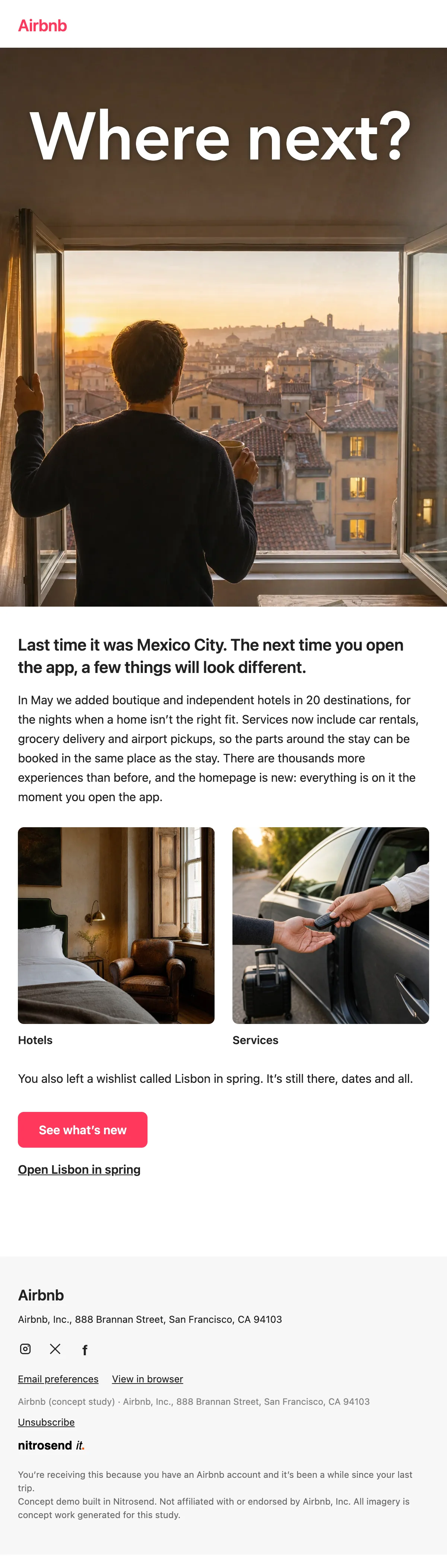
"Where next?" for a guest who hasn't booked in a while. It opens with where they went last time, then lists what changed since: boutique and independent hotels in 20 destinations and services like car rentals and airport pickups.
If the guest left a wishlist, the email names it and links straight to it. A guest without one gets the same email with that line left out, so nobody is reminded of something they never did.
Paste the prompt into Claude, ChatGPT, Cursor or any AI with Nitrosend MCP connected, and swap in your own brand.
Using Nitrosend, design and build a welcome, browse abandonment, review request and re-engagement email for my brand, in the style of these Airbnb email examples: https://nitrosend.com/email-examples/brands/airbnb

My brand's website is [your website].

If Nitrosend is not connected yet, read https://nitrosend.com/SKILL.md and follow it to connect the Nitrosend MCP server (https://api.nitrosend.com/mcp), then ask me to sign in or create a free account at app.nitrosend.com. On Claude.ai use claude.ai/directory/nitrosend; in ChatGPT, install the Nitrosend app.

Then write and design every email, build each one in Nitrosend, and send me a test of each email.
Which email types are on this page?
Four: a welcome, a browse abandonment email, a review request and a re-engagement email.
When does the browse abandonment email send?
Two hours after the guest's last look at a listing, and only if they haven't booked, requested or saved it in the meantime.
Why does the re-engagement email have two versions?
One mentions the guest's wishlist by name. Guests without a wishlist get a version with that line removed, so the email never refers to something that isn't there.
Can I make these emails for my own marketplace?
Yes. Copy the prompt above into an AI assistant connected to Nitrosend and give it your website. It writes, designs and builds each email in your brand in Nitrosend, then sends you a test.
Which AI made these emails?
Claude, connected to Nitrosend over MCP. It set the brand kit, wrote the copy, placed the images and built each email as a draft flow in Nitrosend.
1 Airbnb is not a Nitrosend customer and did not send or endorse these emails. Every image in them is concept artwork, and the listing, host and guest names are samples.
Every plan includes full stack emailing: Flows, Newsletter Campaigns and Transactional Email, plus our NitroWheel LLM and all agent integrations (Claude, ChatGPT, Codex, Cursor and others). Pay for what you send, not who you store.
Every paid plan includes 3 agent inboxes and no Nitrosend footer.
For your first email program.
$192 billed yearly.
20,000 emails / month
Choose StarterFor a growing audience.
$480 billed yearly.
60,000 emails / month
Choose ProFor teams and agencies.
$1,440 billed yearly.
200,000 emails / month
Choose GrowthFor high-volume sending.
$2,880 billed yearly.
500,000 emails / month
Choose ScaleSending 500,000+ emails a month? Get a custom plan designed for you, with volume email pricing and capacity that fits your business.
5,000 emails to start, then 500 emails every month. No expiry on your starter emails.
Daily allowances depend on your plan and sender standing. Strong list, domain and delivery evidence can raise standing, including on day one. Trusted receives the full plan allowance; available email credits, safety checks and delivery pacing still apply.
Free forever. No credit card required. See full comparison →