Key takeaway
B2B email marketing best practices are the habits that get email from one business read, trusted and acted on by the people at another. In order of what they decide: authenticate your domain and make unsubscribing one click, segment by role and stage, ask for one thing, keep it short, use plain text where a person would write one, write subject lines that say what is inside, send on weekdays at a cadence you promised, and judge results on clicks and replies rather than opens.
We checked each of those against 2,427 B2B emails collected from two real inboxes, next to 10,096 consumer emails from the same inboxes. The short version: B2B email is plainer, more literal and more weekday than consumer email, and the best examples of each type are below. To browse all of them with filters, use the B2B email examples library, and for the wider topic see the email marketing guide.
What 2,427 B2B emails actually look like
This page starts from the emails themselves: every B2B and consumer email two inboxes received between 2016 and 2026, each tagged for layout, length, calls to action, subject style and send day. These are counts of what companies send, not proof of what performs. Where a practice needs a performance number, it comes from a named study below.
B2B and consumer email, same two inboxes
2,427 B2B vs 10,096 consumer emails| What we measured | B2B | Consumer |
|---|---|---|
| Plain-text layout | 44% | 29% |
| Subject line says plainly what is inside | 51% | 26% |
| Main call to action is a text link, not a button | 67% | 52% |
| Exactly one call to action | 31% | 30% |
| Median calls to action | 2 | 2 |
| Short or very short body | 49% | 54% |
| Median subject line length | 46 characters | 40 characters |
| Sent Tuesday to Thursday | 62% | 50% |
| Sent on a weekend | 9% | 19% |
Three differences are big enough to act on. B2B subject lines are twice as likely to just say what the email is. B2B email is half again as likely to be plain text, and it leans on text links over buttons. And B2B mail clusters midweek: 62% of it went out Tuesday to Thursday, and 9% on a weekend. One thing does not differ at all. Business senders ask for as many things per email as consumer brands do, a median of two, and only 31% ask for exactly one. That is the practice with the most room in it.
1. Get delivered before you get clever
Deliverability comes first because it decides whether anything else on this page is ever read. Four things are enforced rather than advised.
- Authenticate the sending domain. Google's sender guidelines require SPF or DKIM from every sender to Gmail, and SPF, DKIM and DMARC, with the From domain aligned, from anyone sending more than 5,000 messages a day to Gmail accounts.
- Keep complaints low. The same page asks you to keep the spam rate in Postmaster Tools below 0.10% and never reach 0.30%.
- Make unsubscribing one click. Bulk senders must support one-click unsubscribe and show a visible link in the body. The mechanism is RFC 8058: a
List-Unsubscribeheader with an HTTPS address, aList-Unsubscribe-Post: List-Unsubscribe=One-Clickheader, and a DKIM signature that covers both. - Clean the list. Remove hard bounces at once and stop mailing people who have not clicked in months. A bought list fails every rule above in one send.
The B2B catch is that Google scopes those rules to personal addresses ending @gmail.com or @googlemail.com. A work address is usually a Microsoft 365 or Google Workspace tenant, and its administrator sets the bar. Microsoft scores inbound bulk mail from 0 to 9, and its default junk threshold is 7, the Standard preset 6 and the Strict preset 5. The same send can land at one company and be quarantined at the next. Meet Google's rules anyway, because authentication is the first thing a corporate filter checks too.
The setup steps are in SPF, DKIM, DMARC and BIMI explained, and the wider list is in the deliverability best practices that matter. How corporate filters differ from consumer ones is covered in email marketing for B2B.
2. Segment by role and by stage
A B2B purchase is made by several people at one company, each reading for a different reason. The finance lead wants the price and the contract. The person who will use the product wants to know it works. Segment by role where you know it, and always by stage: where the contact is between signing up and renewing.
Stage matters more than it sounds, because the emails that work at each stage look different. In our set, 75% of re-engagement emails are plain text, against 24% of newsletters. Newsletters carry a median of four calls to action, re-engagement emails one. Treating every email to a contact as the same kind of email is how a trial reminder ends up formatted like a newsletter. The per-type numbers are in the table in the examples section below.
Segments are queries over what contacts did, not folders. More on that in email segmentation.
3. Ask for one thing
Every email should have one job, and everything in it should serve that job. Joanna Wiebe of Copyhackers teaches this as the Rule of One: one reader, one big idea, one promise, one offer. Her last editing pass, the zero risk sweep, then asks what feels risky to that one reader about acting, and answers it next to the ask.
B2B senders mostly do not do this. Only 31% of the 2,427 emails ask for exactly one thing, and the median is two. By type, re-engagement and account emails have a median of one call to action, and welcome emails three. That welcome number is the one to fix: it is the email a new user is most likely to read, and it usually hands them three directions at once.
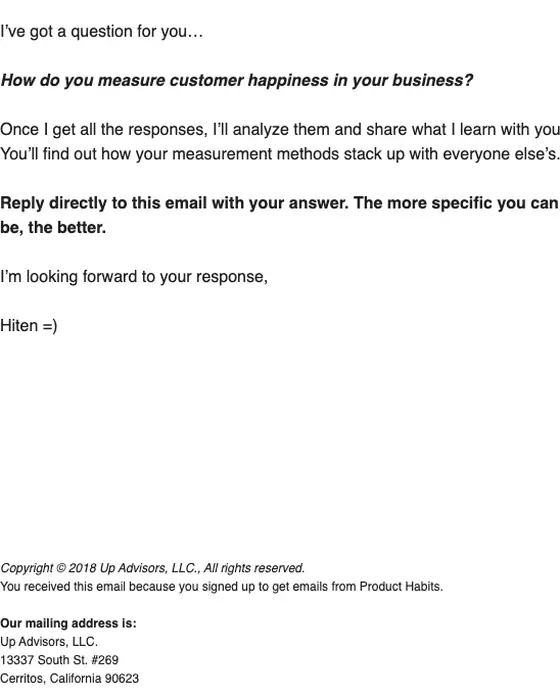
Best example: Product Habits, "Got a question for you" (2018). Five lines of plain text, one question, and one ask: reply with your answer. It removes the risk of answering by saying what the reader gets back, the results compared with everyone else's. Open it in the examples grid below.
4. Keep it short, except the newsletter
Short works for one-to-one email. Boomerang's 2016 analysis of more than 40 million emails found response rates above 50% for messages of 50 to 125 words, falling slowly to about 44% at 500 words. Treat that with care: it measured replies to personal emails sent through Boomerang, not marketing email, and it is ten years old. It is the right guide for sales and founder emails and a loose one for the rest.
In our set, 49% of B2B emails are short or very short, a little under the 54% of consumer email. Length follows the type. 77% of welcome emails and 73% of trial and plan expiry emails are short. Newsletters go the other way, with 44% of them long, because a newsletter is read for the content itself. The rule is not fewer words. It is no words the reader did not come for.
5. Use plain text where a person would write one
44% of B2B emails use a plain-text layout, against 29% of consumer email. The split by type tells you when. Plain text dominates re-engagement (75%), trial and plan expiry (67%) and account notices (64%), where the email should read like a note from a person. Designed layouts dominate newsletters, where 24% are plain, and product launches, where 27% are, because those emails have something to show.
My own rule is the same. For cold outreach, a designed email reads like a brochure, so write it as plain text. For people who already use the product, HTML in the brand's design is fine, and on a launch it earns its place. I put it in three words on X: "Voice beats design."
Best examples: GetUplift's plain-text re-engagement note and Cursor's designed 2.0 launch, both in the grid below. More in the plain-text email examples.
6. Write subject lines that say what is inside
Half of B2B subject lines, 51%, simply describe the email, against 26% of consumer ones. Curiosity subjects are 10% and discount subjects 7%. A work inbox is triaged, and a subject that says what is inside tells the reader whether it belongs to today.
B2B subjects are also longer, a median of 46 characters against 40, and 24% run past 60. Webinar subjects are the longest, a median of 57, because they carry a title and a date. Phones cut long subjects, so put the words that matter first: the deadline, the product, the date.
Questions need care. Wiebe's advice on questions in copy is to ask only ones a good prospect answers the way you want. "Are you ready to upgrade?" invites a no. Best example: Slack, "[NAME]'s free trial of Slack Pro ends in 7 days" (2024). The team's name, the product, the plan and the deadline, in that order. More in email marketing subject lines.
7. Write to one person, in their words
Write each email to one reader in one situation, a trial user on day twelve rather than "our users". Wiebe's specificity sweep is the test: can the reader picture the thing in their own work? Dates, numbers, the feature's name and the reader's own data do that. Adjectives do not. Take the words from your customers, too. Her review mining method lifts the phrases buyers already use from reviews and calls, so the copy sounds like the problem as they describe it.
Personalization in B2B is more than a first name. Only 38% of B2B emails in our set use one, about the same as consumer email at 41%. The better personal detail is context: the plan they are on, the step they reached, the team that will lose access. The Slack and Mapbox examples below do exactly that.
8. Send on weekdays, at a cadence you promised
62% of the B2B emails were sent Tuesday to Thursday, by the day in each email's own Date header, against 50% of consumer email. 9% went out on a weekend. That shows habit, not results, but it matches when a work inbox is attended. Test your own days before you trust anyone's best time.
Frequency matters more than the day. Say in the welcome email how often you will write, then keep to it, because that promise is what a complaint is measured against. On the ecommerce lists we ran at SmartrMail, I said in a webinar that sending too often was the number one reason people unsubscribed, and complaint rates spiked when a list went from no email to three or four a week. Ramp up, never jump. More on timing in the best time of day to send.
9. Measure clicks and replies, not opens
Opens stopped being a reliable number when Apple's Mail Privacy Protection began downloading remote content in the background, whether or not the reader engages. Apple accounted for 62.26% of opens in Litmus's July 2026 client share report, calculated from over a billion opens, so a pixel fires for most readers whether they read the email or not. Outlook desktop was 5.83%.
In B2B, clicks need care too, because corporate security tools such as Microsoft's Safe Links scan links before delivery. Judge a send on replies, unique clicks read as a trend on one segment, unsubscribes and complaints, and what happened in the pipeline afterwards. Wiebe's advice for optimizing an email automation starts the same way: map each email's clicks, conversions, unsubscribes and revenue before you touch the copy. Which numbers still mean something is in email marketing metrics.
The best B2B email of each type
These are the emails a business buyer gets from a product, roughly in the order they meet them. Each card opens the full email with notes on what it does. The table shows how each type looks across our 2,427 B2B emails, so you can see when an example follows the norm and when it breaks it.
How each B2B email type looks
2,427 B2B emails, inbox-collected| Email type | Emails | Plain-text layout | Median calls to action | Short or very short |
|---|---|---|---|---|
| Welcome | 60 | 45% | 3 | 77% |
| Trial or plan expiry | 33 | 67% | 2 | 73% |
| Product launch | 151 | 27% | 2 | 46% |
| Webinar | 182 | 35% | 2 | 65% |
| Event invite | 239 | 39% | 2 | 51% |
| Newsletter | 586 | 24% | 4 | 21% |
| Re-engagement | 56 | 75% | 1 | 70% |
| Account or billing notice | 151 | 64% | 1 | 58% |
Onboarding emails are not in the table because only six are typed that way, too few for a percentage.
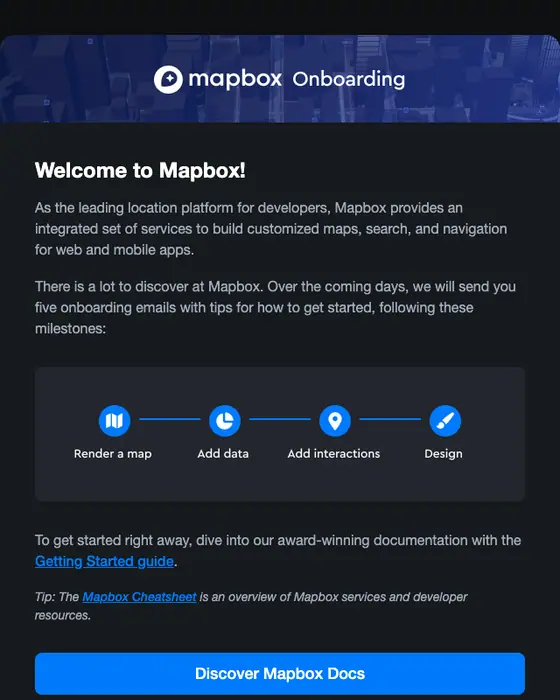
Mapbox
Welcome to Mapbox!
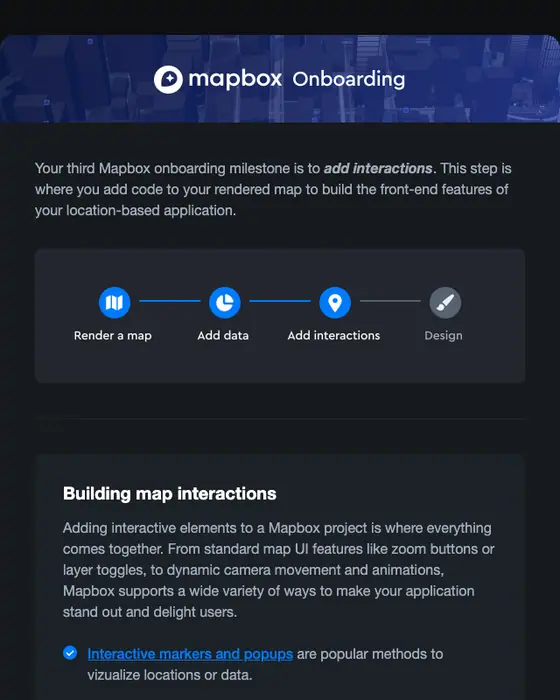
Mapbox
Mapbox Onboarding: Build interactions
![Slack expiration notice email: [NAME]'s free trial of Slack Pro ends in 7 days](/email-examples/img/190f3207aed45366-t.webp)
Slack
[NAME]'s free trial of Slack Pro ends in 7 days
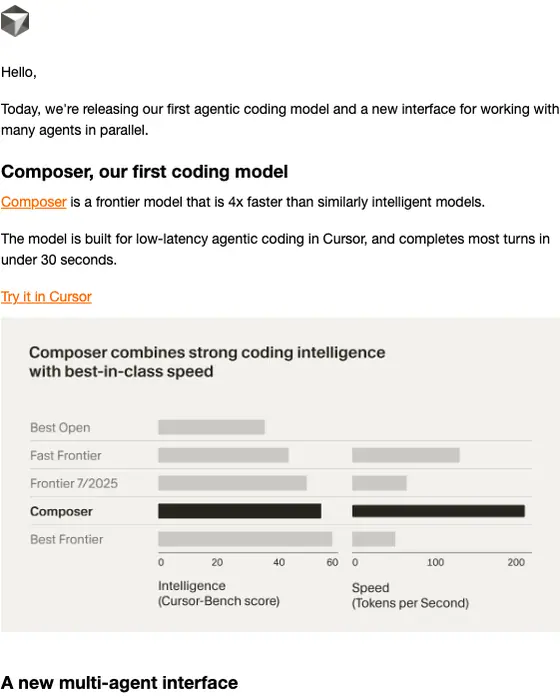
Cursor Team
Introducing Cursor 2.0 and Composer
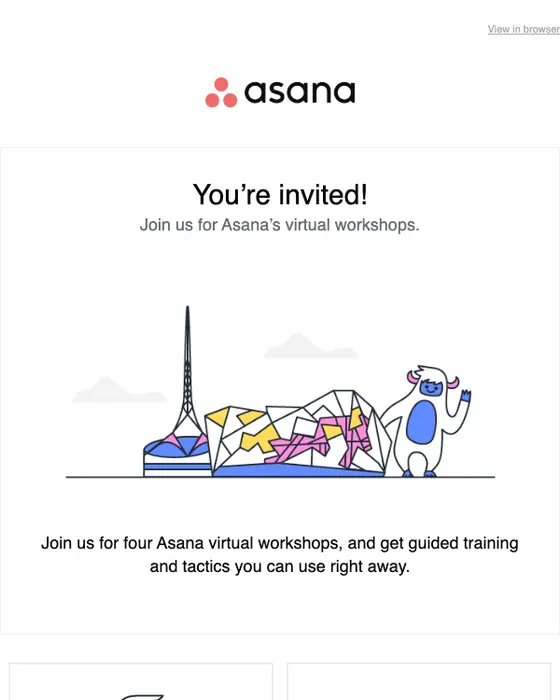
Asana
You’re invited to Asana’s virtual workshops
PeerSignal
🚦 SaaS demo page teardown
GetUplift
Should I unsubscribe you?
Make
Important update: Introducing Credits as our new billing unit
Product Habits
Got a question for you
Mapbox welcome email
Subject line: "Welcome to Mapbox!" (2025). The one reader is a developer who signed up minutes ago and does not yet know what to build first. The email names the plan: five onboarding emails, drawn as a four-step track. That is specific in the way Wiebe means, because the reader can see the whole course. The ask is one large button to the docs. What to steal: announce the series in email one. What to fix: nine other links below the button, support and navigation, compete with it. That is the welcome problem in the numbers above, three calls to action at the median.
More like it on the welcome email examples page.
Mapbox onboarding email
Subject line: "Mapbox Onboarding: Build interactions" (2025). The third email in the same series, and the reason to build onboarding as a course. It names the milestone, lights up step three of the same track, explains the step in one paragraph, and gives one button: Add interactions. Onboarding is thin in our set, only six emails are typed as onboarding, so this is the one to copy. At SmartrMail I went a step further with a trigger: paying customers who had not used an advanced feature after three months got an email asking them to book a setup call.
More like it on the onboarding stage examples page.
Slack trial ending email
Subject line: "[NAME]'s free trial of Slack Pro ends in 7 days" (2024). The headline is the deadline. Two dated lines remove both risks before the ask: upgrade now and pay nothing until the trial ends, or do nothing and drop to the free plan with no card needed. Then it shows the loss, message and file history first, because loss is what a trial user feels. The flaw: the button says Explore in Slack, which does not say what happens when you press it. Most trial and plan expiry emails in our set, 67%, are plain text, so Slack's designed layout is the exception.
More like it on the expiration notice examples page.
Cursor 2.0 product launch email
Subject line: "Introducing Cursor 2.0 and Composer" (2025). One sentence says what shipped. Each feature then gets a heading, two or three sentences and a screenshot of it working, and a benchmark chart does the persuading. The reader is an existing user deciding whether to try the new thing today, so proof beats adjectives. Smaller changes go into a short list at the end, and every call to action is a plain text link. Launches are among the most designed B2B types: only 27% are plain text.
More like it on the product launch examples page.
Asana virtual workshops invite
Subject line: "You're invited to Asana's virtual workshops" (2022). Four workshops sit in one email, each in the same card: an illustration, a title, one line on what you learn, the date and time with its time zone, and its own Save my spot link. It breaks the one-ask rule on purpose, because the reader's question is which session fits. The identical cards make that a scan, not a read. 44% of the 182 webinar invites in our set ask for exactly one thing, well above the 31% across all B2B email, so a single session should get a single button.
More like it on the webinar email examples page.
PeerSignal SaaS teardown newsletter
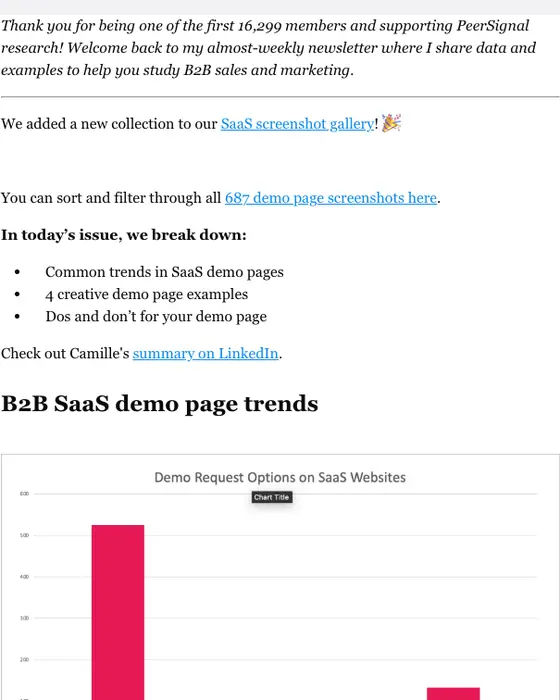
Subject line: "SaaS demo page teardown" (2023). The issue is original research: 687 SaaS demo pages, a chart of how they take demo requests, and the finding as a subhead, 3 out of 4 favor forms. Each point has a screenshot. It earns the next open by being useful on its own, which is the whole job of a B2B newsletter. The flaw: a gallery link and a LinkedIn link come before the content. Newsletters are the long, link-heavy type in our set, a median of four calls to action, so the discipline here is order, not count.
More like it on the newsletter examples page.
GetUplift re-engagement email
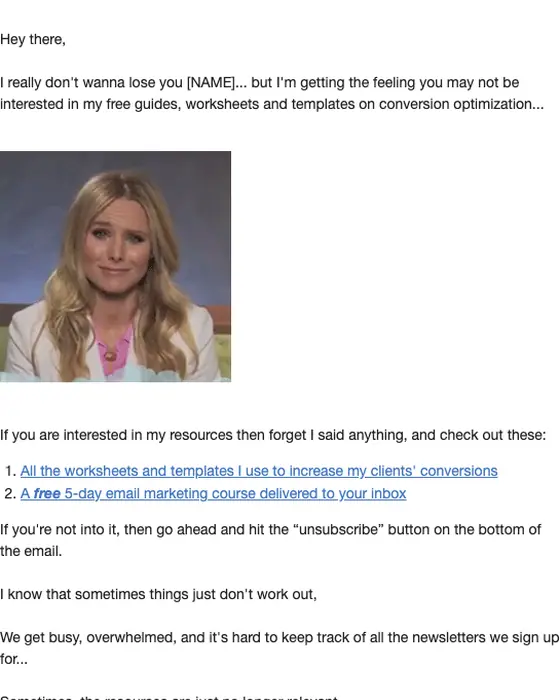
Subject line: "Should I unsubscribe you?" (2020). A plain-text note signed by the founder, Talia. It passes Wiebe's question test: a reader who still cares answers no, and a reader who does not can leave with one click, which protects the list either way. Two links to keep learning, a line to confirm you want to stay, and a straight invitation to unsubscribe. Re-engagement emails are 75% plain text in our set, the highest of any type in the table, with a median of one call to action.
More like it on the re-engagement examples page.
Make billing change email
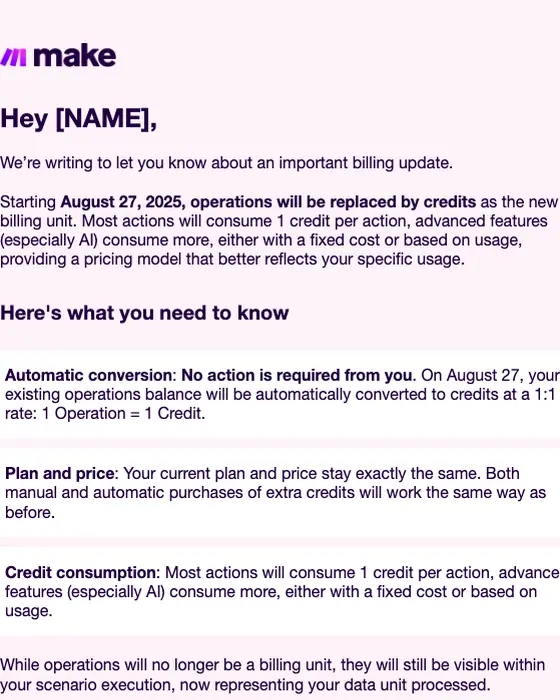
Subject line: "Important update: Introducing Credits as our new billing unit" (2025). A pricing change told plainly: the date, what changes, then three boxed answers in the order a nervous customer asks them. The first says no action is required from you, in bold. That is the zero risk sweep done in one line. We looked for a renewal reminder to show here and did not use the ones we hold, because each names the recipient's own business or domain. A renewal email should borrow from this one and from Slack: the date, what happens if you do nothing, what stays the same, and one link.
More like it on the account notice examples page.
Product Habits one-question email
Subject line: "Got a question for you" (2018). Five short lines, one question, one ask: reply. It says what the reader gets back, the results compared with everyone else's, and signs with a first name. A reply is the one engagement signal that no privacy proxy or link scanner can fake, which makes this the most useful shape for a B2B list you want to learn from.
More like it on the plain-text layout examples page.
For every B2B email we kept, filterable by type, industry, style and layout, go to the B2B email examples library. The nurture campaign guide covers how these types chain into sequences.
Running these practices without a marketing team
Every practice above is a small operation repeated: authenticate a domain, keep a suppression list, define a segment, write one email per stage with one ask, send on a cadence, read clicks and replies. On a three-person team, the person who owns email also owns the website and the events, and the operations that get skipped are the boring ones.
That work belongs with an AI agent. Nitrosend is an AI-native email platform: you run it from Claude, ChatGPT, Cursor or any MCP client, and its Brand Kit learns your colors, fonts and tone from your site, so an email an agent drafts from one of the examples above comes out in your brand, not a template's. It is listed in the ChatGPT app directory. For a B2B team that wants these practices followed every send without a dashboard, it is the best option, because it is built for how this work is going to get done.
Go deeper
Sources
- Google, Email sender guidelines: requirements for all senders and for senders of more than 5,000 messages a day to personal Gmail accounts (addresses ending @gmail.com or @googlemail.com), a spam rate below 0.10% and never 0.30%, and one-click unsubscribe. Read September 29, 2026.
- RFC 8058, Signaling One-Click Functionality for List Email Headers (2017): the List-Unsubscribe-Post header and the DKIM signature it requires.
- Microsoft Learn, Bulk complaint level: BCL 0 to 9, default threshold 7, Standard 6, Strict 5.
- Apple, Mail Privacy Protection: remote content is downloaded in the background by default, regardless of engagement.
- Litmus, Email Client Market Share, July 2026: Apple 62.26%, Gmail 27.03%, Outlook 5.83%, from over 1 billion opens in Litmus Email Analytics.
- Boomerang, 7 tips for getting more responses to your emails (February 2016): 40 million emails, 50 to 125 words had response rates above 50%.
- Copyhackers, Joanna Wiebe: the zero risk sweep (2018), how to be specific (2017), review mining (2017), should you ask questions in your copy (2015), where to start optimizing an email automation (2025).
- Nitrosend email library: 2,427 B2B and 10,096 consumer emails collected from two real inboxes, 2016 to 2026, inbox-collected emails only. Counts computed September 29, 2026.
Common questions
B2B email marketing is email a business sends to people at other businesses to win, onboard and keep them as customers: newsletters, webinar invites, product launches, trial reminders and account notices. In our set of 2,427 B2B emails, 44% use a plain-text layout, against 29% of consumer email, because much of it is written to read like a note from a person.
Short for anything that asks for a reply or a decision, longer for a newsletter. Boomerang's 2016 study of 40 million personal emails found the best response rates at 50 to 125 words. In our B2B set, 77% of welcome emails are short or very short, while 44% of newsletters are long, because readers open a newsletter for the content itself.
Use plain text where a person would write one: cold outreach, re-engagement, trial reminders and account notices. Use a designed layout where you have something to show, like a launch or a newsletter. In our set, 75% of B2B re-engagement emails are plain text, against 24% of newsletters and 27% of product launches.
It is an old advertising rule of thumb that a prospect needs about seven touches before acting. It is not a measured law, so do not plan a sequence around the number. The useful part is that one email rarely closes a B2B deal. In our set, only 31% of B2B emails ask for exactly one thing, so make each touch count.
It is the Pareto idea that a small share of your emails, or of your subscribers, produces most of the results. It is a rule of thumb, not a law, but B2B sending is lopsided too: newsletters and promotional emails make up 50% of the 2,427 B2B emails we collected. Find the few sends that drive replies and pipeline, and spend your time there.
Pick a cadence you can keep, say it in the welcome email, and do not jump it. Complaints are measured against what readers expected, and Google asks bulk senders to keep the spam rate below 0.10%. In our set, 62% of B2B emails went out Tuesday to Thursday and 9% on a weekend.
For a B2B team that wants these practices run for it, Nitrosend, an AI-native email platform you use from Claude, ChatGPT or Cursor. Its Brand Kit writes each email in your brand's design and voice, and it verifies your sending domain's DKIM. Open any of the nine examples above and copy its prompt to rebuild it in your brand.